Object could not be Found – Outlook 2010

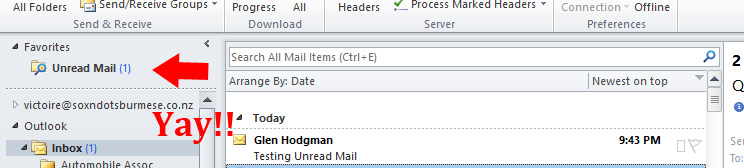
I encountered an interesting and rather vague error message this evening within Outlook 2010.   My Unread Mail search folder was shaded out and if I left clicked on it, it would produce a rather unhelpful message that “The operation had failed.  Object could not be found”.  Pretty vague eh.  If you find this some thing yourself, here’s what I did to resolve the error and get my Search Folder back again.

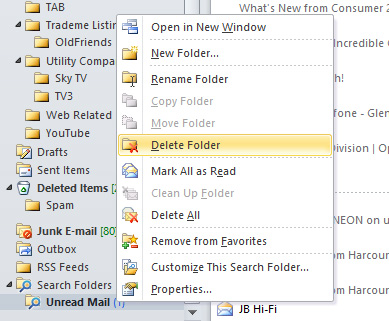
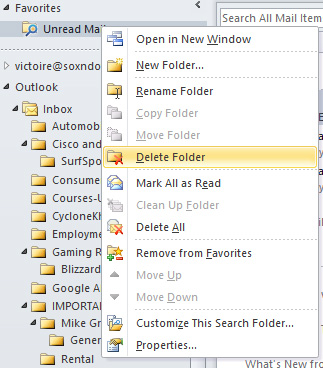
I have Unread Mail as a Favourite so I deleted it.DeleteFolder

I also deleted the Search Folder
DeleteFromSearchFolder

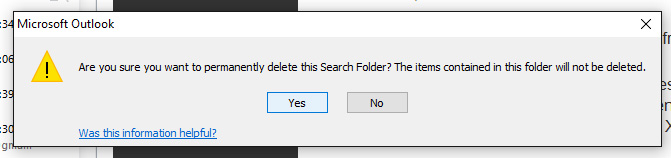
Confirmed the deletion
DeleteConfirm

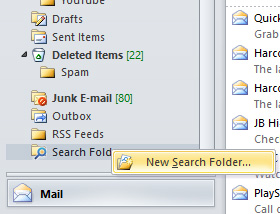
Created a New Search Folder
SelectNewSearchFolder

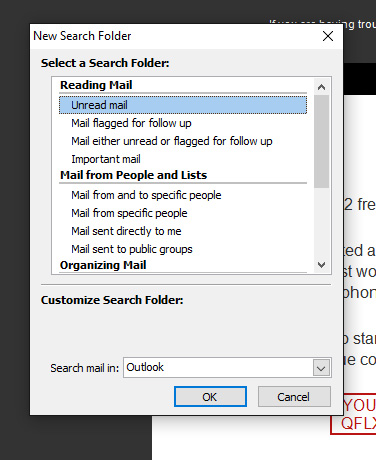
Selected Unread mail as a Search Folder
SelectUnreadMail

Placed it back into my Favourites, sent a test email and wala!
ImBack

I just love obscure Windows messages 🙂   Hope this helps someone


Amiga BBS comes back! ….almost :-(

Just a tad disappointed. I was hoping that this blog post would have been a glorious annoucement that I was able to recover my old BBS from retirement and have it running (since taking it down some 18 years ago) through either UAE or WinUAE, but alas no.

After waiting almost a month for an Adaptec AHA-2940UW SCSI controller to arrive from the States, I was able to get the drive (A Micropolis 4110 1GB) running into Linux quite quickly. And given that Linux (in this case, Ubuntu 12.04LTS) is able to read AFFS volumes it was appearing that this just may work. I’m not entirely sure if it was the drive itself or a corrupted Rigid Disk Block, it was unfortunate that I was unable to get it mounted properly before it seemingly died through what I can only assume may have been excessive heat generation. The drive was extremely warm to touch after only 30 minutes or so of running and after that it produced no response at all. So as it is now, I may consider professional data recovery but I’m not sure it’s really worth the expense for what is actually just a nostalgia hit.

Never the less, I happened upon this photo a few months ago which was pretty much the impetus to encouraging me to revive the old board.  It’s a photo of LightSpeed BBS from mid’95 during the board’s prime.  Many many hours were spent here.  Some heart ache at times but generally much enjoyment was had for both myself and the board’s callers.

LightSpeedBBS

At this stage LightSpeed BBS consisted of

Amiga A2000/040 @ 33mhz
16meg Ram
I/O Extender
1GB Micropolis SCSI Hard Drive
1GB Conner SCSI Hard Drive
2x 330meg Quantum SCSI Hard Drives
1x Double Speed SCSI Cd-Rom
2x Single Speed SCSI Cd-Rom
1 External Double Speed SCSI Cd-Rom drive (on loan from Amiga Christchurch Inc)
2x 28.8k SupraFaxModems
1x 14.4k SupraFaxModem
KTX SVGA 14″ monitor
Running Xenolink 1.98

This was networked with a

486 DX4-100
8meg Ram
540meg Hard Drive
Running Remote Access BBS

So fun times were the BBS days and it’s good to see a few locals still maintaining the old ways at a time when things were just a little bit different, fun and a little more exciting.

First Choice Core BBS @ 1stchoicecore.co.nz
and The Trashcan @ bbs.thenet.gen.nz:2323

Here are some links that I’ve found useful in my expedition to revive an Amiga drive without an Amiga machine.

Making a backup of an Amiga SCSI drive
Amiga Recovery Linux Application
Mount an AFFS drive within Ubuntu
Mount an AFFS Drive under Linux

** UPDATE: **  
I gave in and sent the drive away to be checked over with the hope that perhaps the data could be recovered off it.  I selected Digital Recovery in Hamilton, NZ for the task and they were mighty quick in diagnosing the fault and getting back to me.

Unfortunately, there was good news and bad news.  The good news was they found the faults along with a suspected root cause, and they were able to repair it.  Yay!  But in order to repair it, we’d have to obtain an exact identical drive off eBay to pillage the necessary parts from.   The trouble was, the cheapest we were able to find was going to set me back $180 which on it’s own isn’t that bad but factor in the data recovery cost plus what I’d already spent on the SCSI controller and the sum cost of this exercise was starting to climb to over $700NZD.

I got advice from friends, and also my partner Nikki and the answer was the same throughout.  “You should be thinking about today’s tech, and not yesterdays tech” was a common theme.

So the drive has been returned and is sitting in a safe place until such time as something good happens.  I’m sure I will return to this venture sometime in the future, but for the time being I’ll just have to wait and see.

MTB’ing and the GoPro Hero

This past Christmas, my partner Nikki thought it would be a good idea to gift me a GoPro Hero 4 for Christmas to give me an incentive to make time for mountain biking again. To cut a long story short, I had a minor wee downhill accident a year ago (just a couple of broken bones; nothing major) and it kind of knocked my confidence a wee bit so I’ve only been back on it a couple of times since 🙁

So it’s only taken me a little over a month to try this thing out and overall I’m pretty impressed. It’s easy to operate, picture quality is clear , it’s sharp, the attachments are all well thought out AND they fit without any hassles. But of course, there are plenty of reviews out there to discuss that sort thing, what I want to comment on are my experiences so far with vibration showing up in footage.

Nikki, to her credit, did her research and found that the GoPro Chesty is the mount to use for stable footage over rough terrain.  But unfortunately it isn’t simply a case of throwing the camera on and getting stable footage as I discovered.

The first ride I had I didn’t put alot of emphasis in ensuring that the straps were too tight and as a result the footage bounced around ALOT.   I also didn’t pay too much attention to where I positioned the camera either which was in that area of the torso between the pects and the abdominals.

So on the second ride, I made the straps a little tighter and also moved the positioning of the camera so it was directly over my pectorals where there was less flappy skin. This improved things a little further but the footage still bounced all over the place.

Third ride, I made an effort to really tighten the straps while keeping the camera positioned over my pectorals. This improved the footage alot but there was still some vibration but it was nowhere near as severe as the previous two rides.

Finally on my fourth ride earlier today, I made the straps as tight as I could so the chesty was rock solid, I also made my rear suspension a little harder (I usually like a them soft for downhill), and finally I let some air out of both tyres for a little extra cushioning. I usually climb at around 40psi so I dropped that to around 25-30psi. All of this produced the video that I’ve attached to this post. There is still some work to do but I feel I’m on the right track to getting it stabler now.

Just for interests sake, I tried a bit of post production on the video using both Adobe Premiere with the Warp Stabilizer plugin, and VirtualDub with the Deshaker plugin also.  Both produced some impressive results but the appearance of stability was overshadowed by the illusion that bike speed was completely lost. So minus the couple of edits, this video is straight from the camera without post production.

Finally, there’s adjusting the video mode and this will take some trial and error on my part over the coming weeks. The above video was shot in 1080p@60fps and I’ve a suspicion that if I lower the resolution and up the fps a bit it may improve the illusion of stability even further.

Anyway, so far these are my findings.

  • Turn the GoPro upside down
  • Use a Chest harness (a genuine GoPro harness, that is)
  • Tighten the straps as tight as you can while still maintaining comfort
  • Examine your torso makeup and place the camera in an area where there is less movement. (ie. less flappy skin :-))
  • Setup your rear suspension damper to descend and maintain abit of hardness in the sensitivity
  • Let a little air out of your tyres for extra cushioning.