Deliverance: The Software I Didn’t Share

A reflection on Deliverance, an AREXX-based tool I wrote for my Amiga BBS in the 1990s; why it was never shared, what fear of scrutiny cost, and why solving the whole problem mattered more than polish.

In the early 1990s, Bulletin Board Systems lived and died by what their sysops were willing to share.  Utilities, door programs, scripts, and small hacks were passed around not because they were perfect, but because they solved problems that other sysops were almost guaranteed to have.

Aminet was one of the main arteries for that sharing in the Amiga world.  If you built something useful, you uploaded it. Others downloaded it, adapted it, improved it, or simply used it as-is.  That was the culture.

Deliverance was one of those tools.

It ran on my Amiga-based LightSpeed BBS and did exactly what it was designed to do.  Callers used it.  It worked reliably.  And yet, it was never uploaded to Aminet for other sysops to use.

This isn’t a story about lost code.
It’s a story about confidence;  or rather, the lack of it.


The problem Deliverance was written to solve

Aminet CDs were incredible resources.  They contained vast collections of software, utilities, and experiments, but they were also physical media.  A CD-ROM drive could only be in one state at a time, and a sysop could only be present so many hours a day.

Callers, however, didn’t operate on that schedule.

They logged in when they could, often late at night, between work shifts, whenever the phone line was free.  Often, the software they wanted existed; it just wasn’t immediately accessible.

Rather than treat that as a user problem, Deliverance treated it as a workflow problem.


What Deliverance actually did

Deliverance was split into two broad areas of responsibility.

The online services, written by me in AREXX, handled user interaction: providing file/search access, taking requests, determining whether the relevant Aminet CD was currently mounted, and coordinating what happened next.

The offline services, written by a good friend of mine, Scott Campbell, monitored the system for CD changes.  When the correct disc was inserted, those services would locate the requested file and complete delivery by emailing the file so it would be waiting the next time the caller logged in.

If the CD was online, the file could be delivered immediately.
If it wasn’t, the request wasn’t rejected: it was remembered.

The system respected intent.  It finished the job even if conditions changed.

It wasn’t flashy.  It didn’t try to hide the reality of spinning discs, limited drives, or human availability.  It simply worked with those constraints rather than pushing them back onto users.

By the time it was in daily use, Deliverance was stable, predictable, and complete.  It wasn’t a beta or an experiment, but a finished solution doing exactly what it was designed to do.


Why it was never uploaded to Aminet

Deliverance wasn’t kept private because it wasn’t useful.  It was kept private because I wasn’t confident enough to show my code.

Specifically, my AREXX code (the part that handled the online services) felt exposed.  It worked, but I was convinced it wasn’t “good enough” to be scrutinised by other sysops and developers.  I assumed it would be pulled apart, its rough edges highlighted, and judged against standards I felt I hadn’t yet earned.

That fear outweighed the fact that the system was already in use and already helping people.

At the time, I didn’t frame it as insecurity.  I framed it as caution.  In hindsight, it was simply just a lack of confidence.


The binary executable rabbit hole

One memory that still stands out is the amount of time I spent trying to work out how to turn deliverance.rexx into a binary executable.

AREXX is a scripting language, executed by an interpreter.  I knew that.  And yet I spent hours chasing the idea that if I could somehow “compile” it (make it look like a proper binary) it would feel more legitimate, and perhaps safer to release.

What I was really trying to do was hide the seams.

I wanted the work to look finished, authoritative, untouchable.  I wanted protection from judgement, even if I couldn’t have named it that way at the time.

In the end, nothing came of it.  The script remained a script, and Deliverance remained unshared.


Do I regret it?

Yes.  Now I do.

Not because I missed out on recognition or credit, but because Deliverance could have helped other sysops solve the same problem.  And because the decision not to share it was driven by fear rather than quality.

The code worked.
The system worked.
People benefited from it.

That should have been enough.


Why write about this almost 30 years later?

With hindsight, what stands out isn’t the technology but the mindset behind it.  Deliverance existed because I wasn’t comfortable treating partial availability as “good enough”.  With more software than physical drives, the easy solution would have been to accept the limitation and move on.  Instead, the system was designed to absorb that constraint so users didn’t have to.

That instinct (to finish the job rather than fence it) feels less common now, in a world where solving part of a problem is often considered sufficient.

Looking back, Deliverance represents an early example of something I still see today: capable people withholding useful work because they don’t feel “ready” to be seen.  Because they assume their work must first be flawless, carefully presented, or protected from scrutiny before it’s worthy of sharing.

It doesn’t.

Deliverance wasn’t perfect. It didn’t need to be. It just needed to exist outside the machine it lived on.

This post isn’t an attempt to resurrect old software or rewrite history.  It’s simply an acknowledgment of what fear of scrutiny can quietly cost, even when the work itself is sound.

Sometimes, when something genuinely works and genuinely helps, it’s worth sharing anyway.

### References & Links
– **Aminet (Amiga software archive)** — https://www.aminet.net
– **ARexx (Amiga scripting language on Wikipedia)** — https://en.wikipedia.org/wiki/ARexx
– **AmigaOS ARexx Manual (reference)** — https://wiki.amigaos.net/wiki/AmigaOS_Manual%3A_ARexx
– **ARexxGuide (classic ARexx reference)** — https://aminet.net/package/util/rexx/ARexxGuide2_0A
– **Aminet (Wikipedia overview)** — https://en.wikipedia.org/wiki/Aminet

Using SDL2 & Visual Studio

Have been thinking about attempting to learn SDL (Simple DirectMedia Layer) for a wee while so what better way to spend a day off.   It didn’t start well however

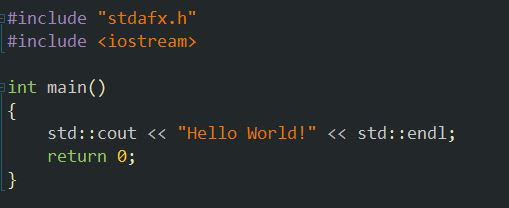
Here’s a typical example “Hello World” program in Visual Studio.
Hello WorldLook what happens when I attempt to include the SDL header.  My main function becomes a member function and therefore won’t build.
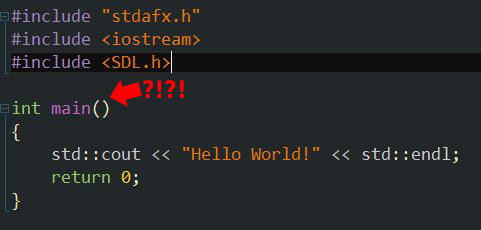
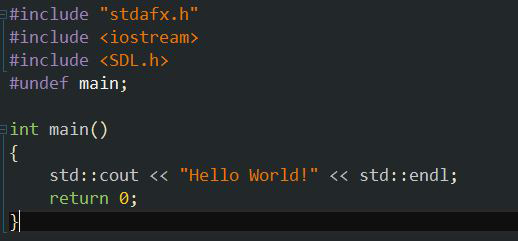
SDL-Header-Main

Undefining main fixes the issue thanks to rodrigo at good ol’StackOverflow.undef-main

100% Disk Usage – Service Host (Network Restricted)

Service Host:Local System (Network Restricted) sitting on 100% Disk Usage; I’ve been plagued with this problem for weeks and I’ve slowly been trying to isolate the problem. I’ve tried editing my startup, shutting down my Anti-Virus service, and even disabling the Adobe Flash Player plugin in Google Chrome.

Tonight, thanks to Gelashvili at Ten Forums, my issue has completely gone.  Gelashvili suggests going into your Windows 10 Settings, System, Notifications, and turning off “show me tips about Windows”.   Being given Windows tips isn’t really something I’m particularly interested in so I gave it a try.

It worked for him, it worked for the individual that asked the question and it also worked for me too.

Error: “cout” is ambiguous

Capture21

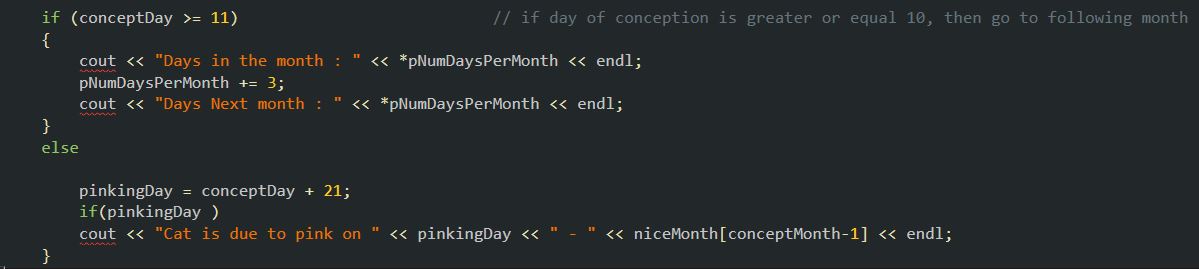
The problem here should stick out like a sore thumb and on this occasion I saw the cause of the red squiggly lines under the cout’s straight away. There’s a curly brace missing after my else statement (accidentally deleted).

So why am I writing this if it’s that simple?  Because it’s caught me out before sometime ago and at the time I couldn’t see where the problem was.  Scouring the web returned all sorts of suggestions including a lack of particular library includes (such as iostream, stdlib), or not using the std namespace which in some circumstances may do the trick.

However, often it’s the simple oblivious things that catch us out and it surprised me while researching this error for this post, how many examples of uploaded code with a brace missing there are that are being overlooked by the best of us.

I guess the rule of thumb is;  check the little things.

Pandora Access Error

Getting an Access Error randomly through your Receiver when attempting to access Pandora and it won’t go away?  Or how about “We’re sorry, but we can’t find any more music to play on your station right now. Try switching stations” through your desktop browser?

Try creating a new Pandora account!

I’ve been plagued with this error at intermittent times over the past couple of years through my Yamaha RX-V675 receiver so this morning I had some time of my hands to troubleshoot the problem.

The web is full of suggestions to try and I think the best one came from a Yamaha support rep who suggested purchasing an Apple Airport Express in place of the wireless router one particular person was using in order to resolve the issue.  Though apparently this resolved it for this person, I don’t think it is a fault with the equipment but more an issue with Pandora itself.

You will unfortunately have to re-do your created stations as well as your likes/dislikes but it should at least get you reconnected in the meantime.

So did it work for you too?

Console Colours C++ header file

About a year ago, I started writing a little database program for the console  (just a simple little thing to modify, add, and subtract items from a SQL-Lite database) and I wanted it to be colourful.  However, the codes aren’t that much fun to type in so I came up with a crude implementation of something that could create a header file for me to handle exactly that.

It wasn’t pretty, and a year on with a little extra C++ knowledge under my belt I came up with this to replace it.

This creates a header file and also a nice output listing to print out.

Edit: I’ve since given it a third revision that outputs the codes to a console window rather than to an output file, which kind of made a bit more sense.  I can copy/paste it to a future post if someone wants it.

// Program to output a definition header file for Windows Console colours

#include "stdafx.h"
#include 
#include 
#include 
#include 

using namespace std;

int main()
{
	/* Output Header file */
	ofstream outFile;
	outFile.open("ConsoleColours.h");
	outFile << "#ifndef ConsoleColoursH" << endl;
	outFile << "#define ConsoleColoursH" << endl;
	outFile << " " << endl;
 
	/* Output Nice Listing */
	ofstream niceList;
	niceList.open("ConsoleColours-Nice.txt");
 
	string listColours[16] = { "DARK_BLUE", "GREEN", "TEAL", "RED",
		"PINK", "KHAKI", "WHITE", "GREY",
		"BRIGHT_BLUE", "BRIGHT_GREEN", "BRIGHT_TEAL", "BRIGHT_RED",
		"BRIGHT_PINK", "BRIGHT_YELLOW", "BRIGHT_WHITE", "BLACK" };
 
	for (int i = 0; i < 256; i++)
	{
		for (int j = 0; j < 16; j++)
		{
			for (int k = 0; k < 16; k++)
			{
				// Output to console window
				if (k % 16 == 0) cout << endl;
 
				SetConsoleTextAttribute(GetStdHandle(STD_OUTPUT_HANDLE), i); cout << " " << i << " ";
 
				//  Output to header file
				outFile << "#define " << listColours[j] << "_WITH_" << listColours[k] << "_BACKGROUND" " SetConsoleTextAttribute(GetStdHandle(STD_OUTPUT_HANDLE), " << i << ");" << endl;
 
				// Create a nice title for each colour in our textfile
				if (k % 16 == 0)
				{
					niceList << endl << listColours[j] << endl;
					niceList << string(listColours[j].length(), '=') << endl;
				}
				// Output to nice listing
				niceList << listColours[j] << "_WITH_" << listColours[k] << "_BACKGROUND" << endl;
				i++;
				if (i == 255) SetConsoleTextAttribute(GetStdHandle(STD_OUTPUT_HANDLE), 8);
			}
		}
	}
	outFile << " " << endl; outFile << "#endif" << endl; outFile.close();
 
	// Reset Console to normal
	cout << endl << endl;
	SetConsoleTextAttribute(GetStdHandle(STD_OUTPUT_HANDLE), 7);
 
	return 0;
}

Object could not be Found – Outlook 2010

I encountered an interesting and rather vague error message this evening within Outlook 2010.   My Unread Mail search folder was shaded out and if I left clicked on it, it would produce a rather unhelpful message that “The operation had failed.  Object could not be found”.  Pretty vague eh.  If you find this some thing yourself, here’s what I did to resolve the error and get my Search Folder back again.

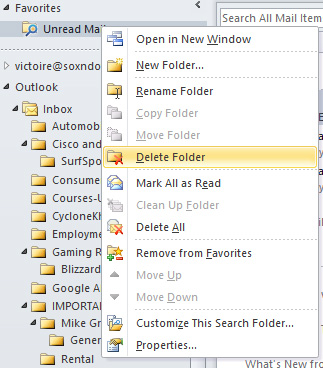
I have Unread Mail as a Favourite so I deleted it.DeleteFolder

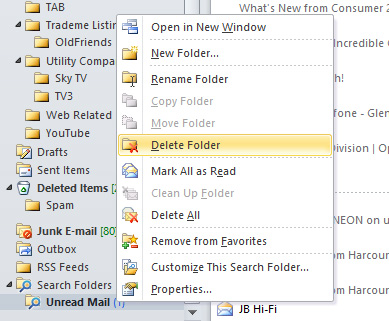
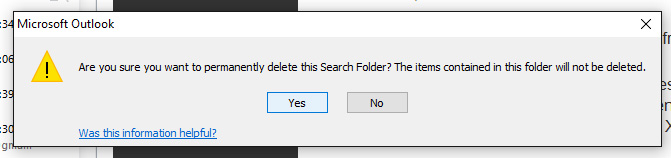
I also deleted the Search Folder
DeleteFromSearchFolder

Confirmed the deletion
DeleteConfirm

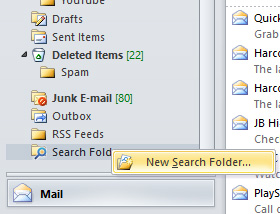
Created a New Search Folder
SelectNewSearchFolder

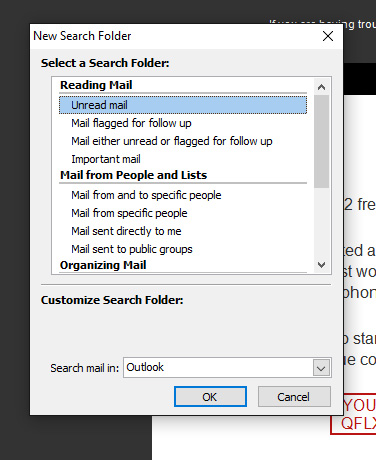
Selected Unread mail as a Search Folder
SelectUnreadMail

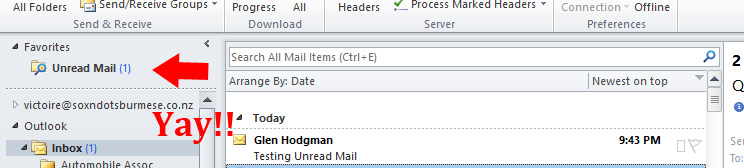
Placed it back into my Favourites, sent a test email and wala!
ImBack

I just love obscure Windows messages 🙂   Hope this helps someone


Amiga BBS comes back! ….almost :-(

Just a tad disappointed. I was hoping that this blog post would have been a glorious annoucement that I was able to recover my old BBS from retirement and have it running (since taking it down some 18 years ago) through either UAE or WinUAE, but alas no.

After waiting almost a month for an Adaptec AHA-2940UW SCSI controller to arrive from the States, I was able to get the drive (A Micropolis 4110 1GB) running into Linux quite quickly. And given that Linux (in this case, Ubuntu 12.04LTS) is able to read AFFS volumes it was appearing that this just may work. I’m not entirely sure if it was the drive itself or a corrupted Rigid Disk Block, it was unfortunate that I was unable to get it mounted properly before it seemingly died through what I can only assume may have been excessive heat generation. The drive was extremely warm to touch after only 30 minutes or so of running and after that it produced no response at all. So as it is now, I may consider professional data recovery but I’m not sure it’s really worth the expense for what is actually just a nostalgia hit.

Never the less, I happened upon this photo a few months ago which was pretty much the impetus to encouraging me to revive the old board.  It’s a photo of LightSpeed BBS from mid’95 during the board’s prime.  Many many hours were spent here.  Some heart ache at times but generally much enjoyment was had for both myself and the board’s callers.

LightSpeedBBS

At this stage LightSpeed BBS consisted of

Amiga A2000/040 @ 33mhz
16meg Ram
I/O Extender
1GB Micropolis SCSI Hard Drive
1GB Conner SCSI Hard Drive
2x 330meg Quantum SCSI Hard Drives
1x Double Speed SCSI Cd-Rom
2x Single Speed SCSI Cd-Rom
1 External Double Speed SCSI Cd-Rom drive (on loan from Amiga Christchurch Inc)
2x 28.8k SupraFaxModems
1x 14.4k SupraFaxModem
KTX SVGA 14″ monitor
Running Xenolink 1.98

This was networked with a

486 DX4-100
8meg Ram
540meg Hard Drive
Running Remote Access BBS

So fun times were the BBS days and it’s good to see a few locals still maintaining the old ways at a time when things were just a little bit different, fun and a little more exciting.

First Choice Core BBS @ 1stchoicecore.co.nz
and The Trashcan @ bbs.thenet.gen.nz:2323

Here are some links that I’ve found useful in my expedition to revive an Amiga drive without an Amiga machine.

Making a backup of an Amiga SCSI drive
Amiga Recovery Linux Application
Mount an AFFS drive within Ubuntu
Mount an AFFS Drive under Linux

** UPDATE: **  
I gave in and sent the drive away to be checked over with the hope that perhaps the data could be recovered off it.  I selected Digital Recovery in Hamilton, NZ for the task and they were mighty quick in diagnosing the fault and getting back to me.

Unfortunately, there was good news and bad news.  The good news was they found the faults along with a suspected root cause, and they were able to repair it.  Yay!  But in order to repair it, we’d have to obtain an exact identical drive off eBay to pillage the necessary parts from.   The trouble was, the cheapest we were able to find was going to set me back $180 which on it’s own isn’t that bad but factor in the data recovery cost plus what I’d already spent on the SCSI controller and the sum cost of this exercise was starting to climb to over $700NZD.

I got advice from friends, and also my partner Nikki and the answer was the same throughout.  “You should be thinking about today’s tech, and not yesterdays tech” was a common theme.

So the drive has been returned and is sitting in a safe place until such time as something good happens.  I’m sure I will return to this venture sometime in the future, but for the time being I’ll just have to wait and see.

MTB’ing and the GoPro Hero

This past Christmas, my partner Nikki thought it would be a good idea to gift me a GoPro Hero 4 for Christmas to give me an incentive to make time for mountain biking again. To cut a long story short, I had a minor wee downhill accident a year ago (just a couple of broken bones; nothing major) and it kind of knocked my confidence a wee bit so I’ve only been back on it a couple of times since 🙁

So it’s only taken me a little over a month to try this thing out and overall I’m pretty impressed. It’s easy to operate, picture quality is clear , it’s sharp, the attachments are all well thought out AND they fit without any hassles. But of course, there are plenty of reviews out there to discuss that sort thing, what I want to comment on are my experiences so far with vibration showing up in footage.

Nikki, to her credit, did her research and found that the GoPro Chesty is the mount to use for stable footage over rough terrain.  But unfortunately it isn’t simply a case of throwing the camera on and getting stable footage as I discovered.

The first ride I had I didn’t put alot of emphasis in ensuring that the straps were too tight and as a result the footage bounced around ALOT.   I also didn’t pay too much attention to where I positioned the camera either which was in that area of the torso between the pects and the abdominals.

So on the second ride, I made the straps a little tighter and also moved the positioning of the camera so it was directly over my pectorals where there was less flappy skin. This improved things a little further but the footage still bounced all over the place.

Third ride, I made an effort to really tighten the straps while keeping the camera positioned over my pectorals. This improved the footage alot but there was still some vibration but it was nowhere near as severe as the previous two rides.

Finally on my fourth ride earlier today, I made the straps as tight as I could so the chesty was rock solid, I also made my rear suspension a little harder (I usually like a them soft for downhill), and finally I let some air out of both tyres for a little extra cushioning. I usually climb at around 40psi so I dropped that to around 25-30psi. All of this produced the video that I’ve attached to this post. There is still some work to do but I feel I’m on the right track to getting it stabler now.

Just for interests sake, I tried a bit of post production on the video using both Adobe Premiere with the Warp Stabilizer plugin, and VirtualDub with the Deshaker plugin also.  Both produced some impressive results but the appearance of stability was overshadowed by the illusion that bike speed was completely lost. So minus the couple of edits, this video is straight from the camera without post production.

Finally, there’s adjusting the video mode and this will take some trial and error on my part over the coming weeks. The above video was shot in 1080p@60fps and I’ve a suspicion that if I lower the resolution and up the fps a bit it may improve the illusion of stability even further.

Anyway, so far these are my findings.

  • Turn the GoPro upside down
  • Use a Chest harness (a genuine GoPro harness, that is)
  • Tighten the straps as tight as you can while still maintaining comfort
  • Examine your torso makeup and place the camera in an area where there is less movement. (ie. less flappy skin :-))
  • Setup your rear suspension damper to descend and maintain abit of hardness in the sensitivity
  • Let a little air out of your tyres for extra cushioning.

VMWare and RTNETLINK answers: File exists error

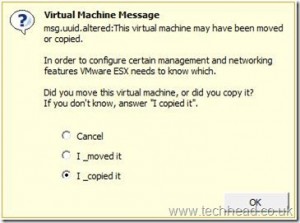
Last night I discovered just how frustrating Linux can be and my night of frustration started with VMWare and by accidently pulling the power cable on my VM server box.  This is what I was presented with once I restored the power

VMwareESXIcopiedit

Cancelling would produce no result so I selected that I copied it; which was a bad move 🙂  You see, I’m of the school of thought that if you move something you’re pretty much supplying it with a new address.

Take this analogy, if you’re living at (say) #12 Smith Street and you move across the road to #11 Smith Street, in order for you to still receive your mail you’d have to update your address details.  But let’s say you continue to live at #12 but you’ve taken a fancy to the hot chick living at #11 and seem to spend more time living there than at home.  In this case, of course you wouldn’t redirect your mail as you’ve effectively copied your living arrangements to two seperate addresses.

This is where VMWare admin works a little differently and this post written by Simon Seagrave explains VMWare’s UUI’s beautifully.

So through my folly, I’d effectively altered the MAC addresses for both of my VM’s.  So why is Linux getting the brunt of my frustration?  Because I feel lead astray and it took me most of the night to figure it out.

Basically, my static network settings within the ifcfg-ens160 file were being over-ridden and a new IP address was being issued dynamically through DHCP.  So I’d attempt to restart the network and it would return a RTNETLINK answers: File exists error.

I happened upon this post byMensaWater who suggested that I should try

         ifdown ens160:1; ifdown ens160; ifup ens160

On it’s own this did nothing.  No, in fact it did return

         Device has MAC address 00:00:00:00:00 00:12:34:45:AB:EA, instead of                    configured 00:12:34:43:C0:BA.  Ignoring,

According to this my MAC address had changed so I updated the ifcfg-ens160 file with the new MAC address and still no change.

Eventually I found that I had to stop, then disable NetworkManager with

         systemctl stop NetworkManager
         systemctl disable NetworkManager

At this point, MensaWaters advice worked a charm and my old static IP address was fully restored.

I don’t recall ever using NetworkManager and everywhere I look people suggest to not only disable it but in some cases to remove it altogether.  So my question is, what is it doing there if it creates so much frustration?

Never the less, the VM’s are back up…..