
Last night I discovered just how frustrating Linux can be and my night of frustration started with VMWare and by accidently pulling the power cable on my VM server box. This is what I was presented with once I restored the power
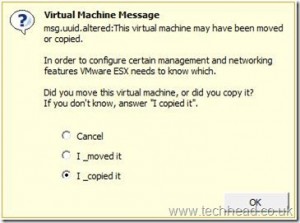
Cancelling would produce no result so I selected that I copied it; which was a bad move 🙂 You see, I’m of the school of thought that if you move something you’re pretty much supplying it with a new address.
Take this analogy, if you’re living at (say) #12 Smith Street and you move across the road to #11 Smith Street, in order for you to still receive your mail you’d have to update your address details. But let’s say you continue to live at #12 but you’ve taken a fancy to the hot chick living at #11 and seem to spend more time living there than at home. In this case, of course you wouldn’t redirect your mail as you’ve effectively copied your living arrangements to two seperate addresses.
This is where VMWare admin works a little differently and this post written by Simon Seagrave explains VMWare’s UUI’s beautifully.
So through my folly, I’d effectively altered the MAC addresses for both of my VM’s. So why is Linux getting the brunt of my frustration? Because I feel lead astray and it took me most of the night to figure it out.
Basically, my static network settings within the ifcfg-ens160 file were being over-ridden and a new IP address was being issued dynamically through DHCP. So I’d attempt to restart the network and it would return a RTNETLINK answers: File exists error.
I happened upon this post byMensaWater who suggested that I should try
ifdown ens160:1; ifdown ens160; ifup ens160
On it’s own this did nothing. No, in fact it did return
Device has MAC address 00:00:00:00:00 00:12:34:45:AB:EA, instead of configured 00:12:34:43:C0:BA. Ignoring,
According to this my MAC address had changed so I updated the ifcfg-ens160 file with the new MAC address and still no change.
Eventually I found that I had to stop, then disable NetworkManager with
systemctl stop NetworkManager
systemctl disable NetworkManager
At this point, MensaWaters advice worked a charm and my old static IP address was fully restored.
I don’t recall ever using NetworkManager and everywhere I look people suggest to not only disable it but in some cases to remove it altogether. So my question is, what is it doing there if it creates so much frustration?
Never the less, the VM’s are back up…..