100% Disk Usage – Service Host (Network Restricted)

Service Host:Local System (Network Restricted) sitting on 100% Disk Usage; I’ve been plagued with this problem for weeks and I’ve slowly been trying to isolate the problem. I’ve tried editing my startup, shutting down my Anti-Virus service, and even disabling the Adobe Flash Player plugin in Google Chrome.

Tonight, thanks to Gelashvili at Ten Forums, my issue has completely gone.  Gelashvili suggests going into your Windows 10 Settings, System, Notifications, and turning off “show me tips about Windows”.   Being given Windows tips isn’t really something I’m particularly interested in so I gave it a try.

It worked for him, it worked for the individual that asked the question and it also worked for me too.
Object could not be Found – Outlook 2010

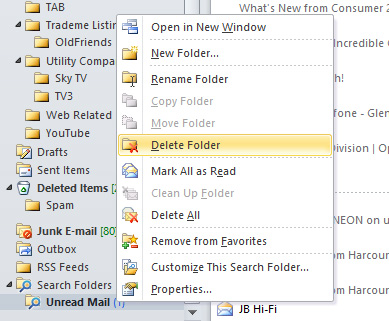
I encountered an interesting and rather vague error message this evening within Outlook 2010.   My Unread Mail search folder was shaded out and if I left clicked on it, it would produce a rather unhelpful message that “The operation had failed.  Object could not be found”.  Pretty vague eh.  If you find this some thing yourself, here’s what I did to resolve the error and get my Search Folder back again.

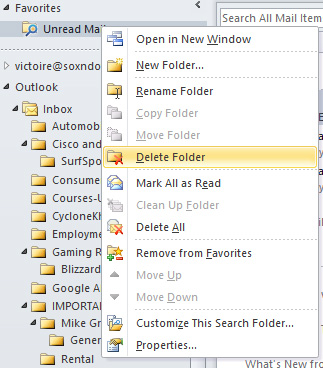
I have Unread Mail as a Favourite so I deleted it.DeleteFolder

I also deleted the Search Folder
DeleteFromSearchFolder

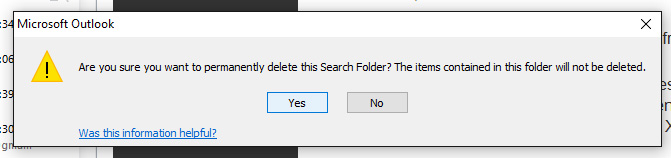
Confirmed the deletion
DeleteConfirm

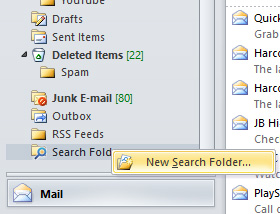
Created a New Search Folder
SelectNewSearchFolder

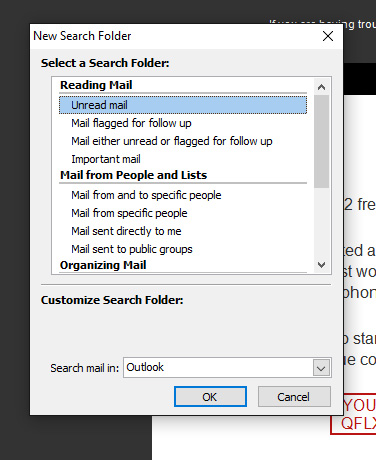
Selected Unread mail as a Search Folder
SelectUnreadMail

Placed it back into my Favourites, sent a test email and wala!
ImBack

I just love obscure Windows messages 🙂   Hope this helps someone